getProgramAccounts (15ms p50 for top dexes) & getTransactionsForAddress (signatures and transaction data in a single call). Unlock Now!How to update metadata URI for an NFT on Solana

Team Shyft
· January 22, 2026
NFT Metadata is the unique properties or details which make an NFT different from each others. In this article, we will see how we can update the metadata URI of an NFT on Solana using SHYFT APIs.
Non-fungible Tokens (or NFTs) are unique digital assets on a Blockchain. NFTs can be any digital assets, such as a video, image, or gaming item one person owns. Each NFT has “unique” properties or details that make them different. These properties or details are known as the Metadata of that particular NFT or simply NFT Metadata.
Metadata defines and contributes to the appearance of an NFT. Some of the common examples are name, symbol, description, properties, or any information deemed necessary by the NFT creator. NFT metadata can be stored in two ways, either on-chain, where all the NFT information lives on the blockchain itself, or off-chain where the NFT information is stored in some peer-to-peer distributed file system such as IPFS. In the case of off-chain storage, the metadata information stored in the distributed file system can be accessed using a specific URI, which is known as the metadata_uri and this is available on-chain. In this article, we will see how we can update the metadata_uri of an NFT on Solana Blockchain using SHYFT APIs.
Read SHYFT API Documentation here.
Before getting started
To get started, we will need a few things.
Authentication: Getting your Shyft API key
x-api-key is an authentication parameter, which gives you access to SHYFT APIs. You can get your own API Key from the SHYFT website. Just signup with your email id here and you can get it for free.
Phantom Wallet
We will need the Phantom wallet browser extension, you can download it from the link below.
Once done, set up your Phantom wallet account. On-screen tips are available, which will guide you through setting up and getting started. You can also find a detailed guide related to this here.
Collecting the details of the NFT to be updated
Before we start the process of updating the metadata, we have to check if we have the authority to update that particular NFT. For a user to update the metadata of an NFT, the user’s wallet should have the update authority for that NFT. Update authority for any NFT is defined when the NFT is created and does not change even if the NFT is traded from one wallet to another. We also need a few other pieces of information related to the NFT before we proceed to update the NFT. We have used a simple form (on React) to collect the details of an NFT, but any other method can be used as per requirement or convenience.
Press enter or click to view image in full size
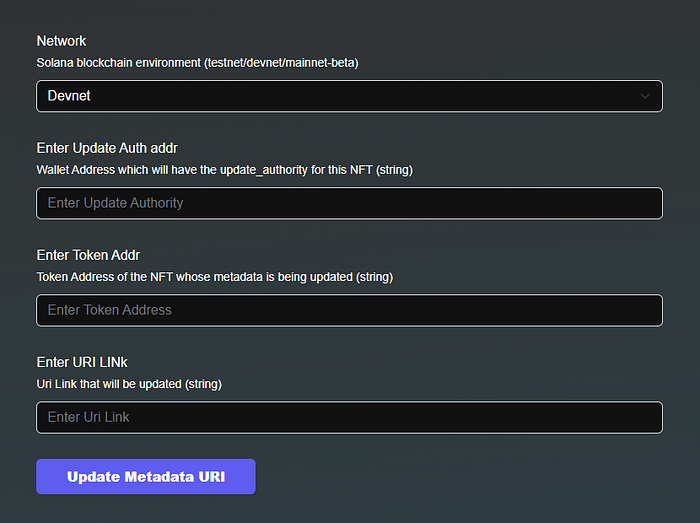
Form to accept the details of the NFT to be updated
Once we have all the data related required, we proceed to make the API call. Please note that the metadata to be updated should be according to the metaplex non-fungible standard.
Updating the NFT Metadata: The API call
SHYFT provides a comprehensive set of Web3 APIs for NFTs, Tokens, Wallets, and Marketplace on Solana. The API endpoint for updating NFT metadata:
POST https://api.shyft.to/sol/v1/nft/update_metadata_uriThis API accepts thex-api-key parameter in the header, which is an authorization parameter used by SHYFT for validating its users. You can get your own **x-api-key** from the SHYFT website for free here.
Get Team Shyft’s stories in your inbox
Join Medium for free to get updates from this writer.
Parameters used for this API call:
network: Selects the Solana network cluster, which can be eitherdevnet,testnetormainnet-beta. The NFT to be updated has to be on this network.token_address: Accepts the Token Address of the NFT whosemetadata_uriwe are attempting to update.update_authority_address: Specifies the wallet address which has the update_authority of the NFT.metadata_uri: Accepts the NFT metadata URL that contains metadata of NFT in JSON format.fee_payer: Accepts the wallet address of the wallet from which the gas fees of this transaction will be deducted. This is an optional parameter, if not supplied the transaction fees will be paid by the wallet mentioned inupdate_authority_address.service_charge: Accepts an additional amount which will be deducted from thefee_payerwallet. This is an optional parameter and accepts three fields namely, thereceiver,tokenandamount. Thereceiveraccepts the wallet address of the service charge receiver,tokenaccepts the token address of SPL Token which will be given out as a service charge, andamountdefines the amount of SPL tokens to be given out as a service charge.
For details on the parameters of the API, read our dev docs here.
Once the request has been successfully executed, the response returned will contain the encoded_transaction which will require a signature from the gas fees payer wallet before being executed. The response returned will look somewhat like this.
{
  "success": true,
  "message": "NFT metadata_uri update request generated successfully",
  "result": {
    "encoded_transaction": "AQAAAAAAAAAAAAAAAAAAAAAAAAAAAAAAAAAAAAAAAAAAAAAAAAAAAAAAAAAAAAAAAAAAAAAAAAAAAAAAAAAAAAABAAEDQCwHlX8JKKwKpawHjfHTp+lyU5gx9wU2rGxk2NoSXtodMSdev+DxU149+BuHwrHyERE4lK+pDqz1cPOaPnPAO56DKHpPnPqQtwZbHj0XxFOJ1Sf2sEw81YuGxzGqD9tUm20bwD+ClGZ75+gzsF6WPLOQgC+tL75bEdK/l5cBP0MXH6KxOmXycBAgIBALwBDwEEAAAASG9sYQIAAABITFgAAABodHRwczovL25mdHN0b3JhZ2UubGluay9pcGZzL2JhZmtyZWlod2Vxd3lkd29iaG9yM2FzZjd1YWFocm5tc3c2cDdnNnh5cnl6a2p4dTJuM2ZrZ2d6dnd5BQABAQAAABjKn1HFRx7tvpclOYMfcFNqxsZNjaEl7aHTEnXr/g8VAWQAAAEYyp9RxUce7b6XJTmDH3BTasbGTY2hJe2h0xJ16/4PFQEAAQE="
  }
}
Signing The Transaction
The encoded_transaction received in the previous step needs a signature from the fee_payer wallet before it is executed by the Solana Runtime. If the fee_payer is absent, the **update_authority_address** wallet will sign this transaction. We will use the following function to sign the transaction from the user’s wallet.
export async function confirmTransactionFromFrontend(connection, encodedTransaction, wallet) {
  console.log(encodedTransaction);
  const recoveredTransaction = Transaction.from(
    Buffer.from(encodedTransaction, 'base64')
  );
  const signedTx = await wallet.signTransaction(recoveredTransaction);
  const confirmTransaction = await connection.sendRawTransaction(
    signedTx.serialize()
  );
  return confirmTransaction;
}
For details on the parameters of this function, or to know more about how to sign encoded_transactions on Solana, please refer to our dev guide here. You can find all the functions related to signing transactions in our GitHub Repo here.
Once successfully signed, the instructions will be executed by the Solana Runtime and the metadata_uri will be updated.
That’s pretty much everything about this article where we see how we can update the metadata_uri of an NFT using SHYFT APIs. If you enjoyed this article, please feel free to check out our other articles on How to get paginated transactions on Solana or How to integrate eCommerce Loyalty Reward System on Solana(Series). We hope you have a great time building dApps on Solana using SHYFT APIs. Happy Hacking!
Resources
Join our Discord
Related Posts

How to track all $Booty token swaps in one hour on Orca
In this article, we will explore an intuitive way of tracking all $Booty token swaps in an hour on Orca, powered by SHYF...
January 22, 2026
How to Redeem Solana Loyalty Tokens on eCommerce Website(Part 3)
Loyalty-based eCommerce websites have grown popular in recent years. This article illustrates how to let users of an eCo...
January 22, 2026
How to reward Solana loyalty tokens on an eCommerce website(Part 2)
Loyalty rewards on eCommerce websites are quite common these days. This blog illustrates how you can build an eCommerce ...
January 22, 2026

Get in touch with our discord community and keep up with the latest feature
releases. Get help from our developers who are always here to help you take off.