getProgramAccounts (15ms p50 for top dexes) & getTransactionsForAddress (signatures and transaction data in a single call). Unlock Now!How to track all $Booty token swaps in one hour on Orca

Team Shyft
· January 22, 2026
In this article, we will explore an intuitive way of tracking all $Booty token swaps in an hour on Orca, powered by SHYFT’s comprehensive Transaction APIs for Solana.
Liquidity pools represent one of the core technologies driving the DeFi ecosystems. In Decentralized Finance(DeFi) platforms, Liquidity pools enable users to trade cryptocurrencies without relying on traditional intermediaries like centralized exchanges. Instead, liquidity is provided by users who deposit their cryptocurrency assets into these pools. One such examples of Liquidity pool on Solana is Orca Whirlpool. In today’s episode, we will delve into an intuitive approach of tracking Booty token swaps on Orca.
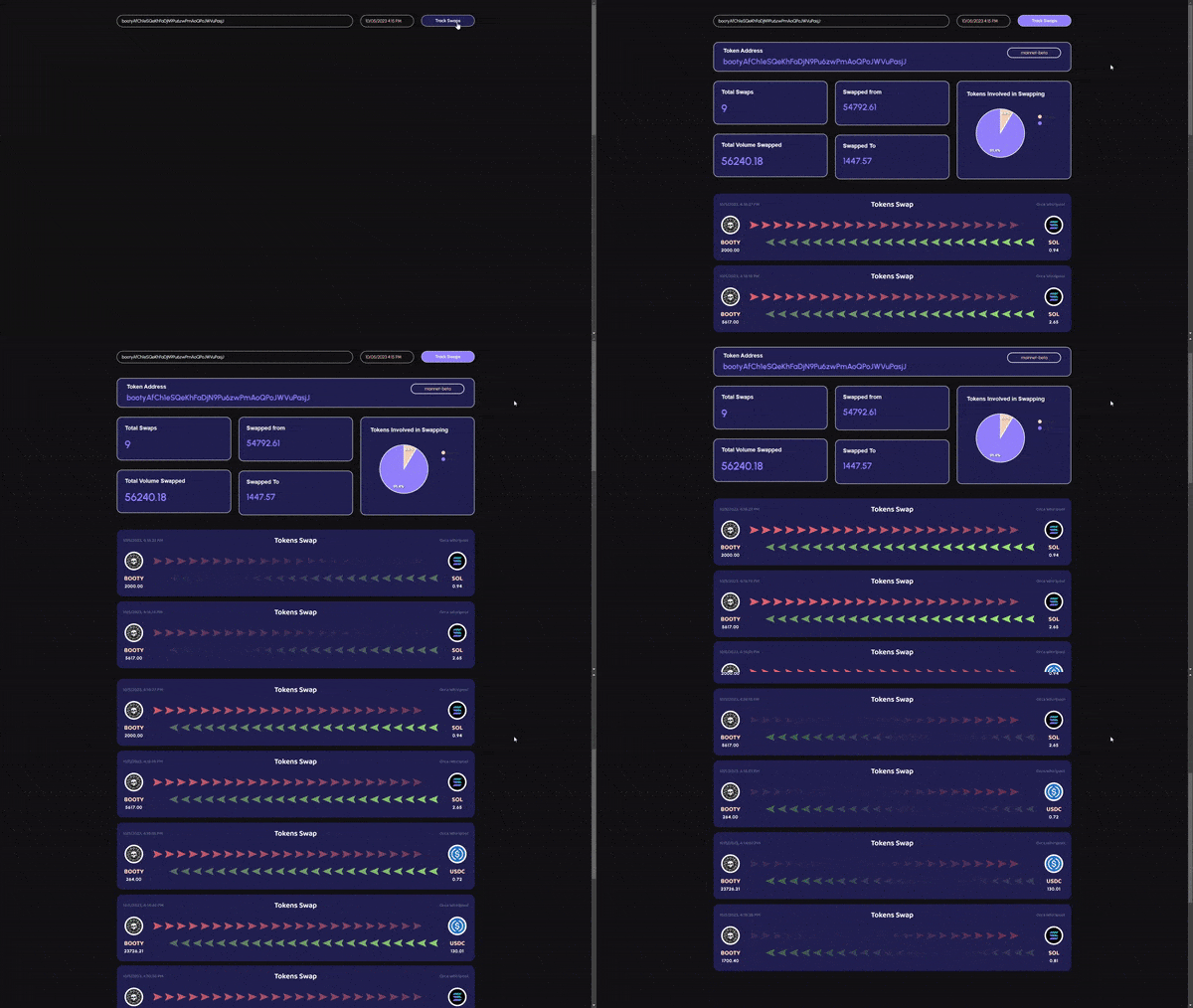
A dashboard for tracking $booty tokens on Orca, powered by SHYFT APIs
Feel free to checkout this project on GitHub, and if you like it, please add some stars to the repository.
Before getting started
To get started, we will need a few things.
Register your SHYFT account and get your own Shyft API key
x-api-key is an authentication parameter, which gives you access to SHYFT APIs.
You can get your own API Key from the SHYFT website.
Just signup with your email id here and you can get it for free. If you already have a SHYFT API Key, please skip this step.
NextJs or any dev environment/stack that supports API calls
We have used Next JS for this project, but this can be done in any application development environment.
But how can SHYFT APIs help me build this? Let’s get started right away.
Tracking $Booty Token swaps on Orca: Steps involved
Suppose, we have a token address (which in our case is booty token address), and we want to track the number of swaps taking place in an hour on a particular liquidity pool (in our case which is Orca Whirlpool). We have to perform the following steps:
— We obtain all transactions which involves booty tokens directly or indirectly for a particular hour.
— Once complete, we filter out all the transactions of the “SWAP” type from the set of transactions we received in the last step. This should leave us with a set which will have transactions only of the “SWAP” type.
— We then iterate through each transaction from the previous “SWAP” set, and find out the swaps that have been done on the Orca Whirlpool platform. And voila, the final set will only contain successful Swaps from Orca, and can be presented to the user in a proper manner.
Getting transactions involving Booty Token
In the first step, we fetch all the transactions involving Booty tokens. There are various methods for getting transactions on Solana, but we will explore one of the most convenient methods of fetching transactions on Solana, which is using SHYFT API or using SHYFT’s very own JS SDK for Solana.
SHYFT provides a comprehensive set of APIs, exclusively for Solana Blockchain, that includes APIs for Non-Fungible Tokens(NFTs), Fungible Tokens(cryptocurrencies), crypto-wallets as well as transactions. Moreover, SHYFT also provides a JS SDK which is an extremely useful tool for developers who are building on Solana. The API endpoint for getting transactions for a particular account on Solana:
GET https://api.shyft.to/sol/v1/transaction/historyParameters required for this API call
All SHYFT APIs accept the x-api-key parameter in the header, which is used as an authorization parameter for using SHYFT APIs. You can get your free API key from SHYFT website here. This API supports pagination.
network: can bedevnet,testnetormainnet-beta.account: The account address whose transactions we are attempting to fetch, in our case this will be the Booty token addressbootyA..…sjJ.tx_num(optional): Indicates the number of transactions to be fetched at a time.before_tx_signature(optional): Transactions are fetched in the order of the most recent transaction first. This field accepts a transaction signature and will fetch all the transactions before this transaction (in time).enable_raw: All transactions returned from this endpoint are “Human-readable” parsed Transactions from Solana. If this is set to true, raw transactions are also returned along with parsed transactions.
Once successfully executed, the response returned contains an array of parsed transactions related to the account provided in the address field. The response has the following structure.
{
    "success": true,
    "message": "Transaction history fetched successfully",
    "result": [
        "timestamp": "2023-08-22T15:37:38.000Z",
            "fee": 0.000105,
            "fee_payer": "H6ZLTRpVXobSYuNWufG8iqN9dMRQyZkXXSR5nEaeW73r",
            "signers": [
                "H6ZLTRpVXobSYuNWufG8iqN9dMRQyZkXXSR5nEaeW73r"
            ],
            "signatures": [
                "43rcisywmVC7JATBi2TRZX4z2jiEjzvi9BaFts1z5rLvpf5RpQ82c7QoQGzKgGpfm33NV3RMp22qTyMcaLEnNDNe"
            ],
            "protocol": {
                "address": "9ehXDD5bnhSpFVRf99veikjgq8VajtRH7e3D9aVPLqYd",
                "name": "FOXY_RAFFLE"
            },
            "type": "BUY_TICKETS", //main action indicating Rtype of transaction
            "status": "Success",
            "actions": [
                {
                    "info": {
                        "raffle_address": "9BSvwaVkHBjciQ5UshiiguL1ucSqLv2LXDRcKBGf6Bj1",
                        "currency": "So11111111111111111111111111111111111111112",
                        "ticket_price": 0.245, //each ticket price
                        "tickets": 10, //tickets bought by the buyer
                        "buyer": "H6ZLTRpVYobSYuNWufG8iqN9xMRQyZkXXSR5nEaeW73r" //buyer
                    },
                    "source_protocol": {
                        "address": "9ehXDD5bnhSpFVRf99veikjgq8VajtRH7e3D9aVPLqYd",
                        "name": "FOXY_RAFFLE"
                    },
                    "type": "BUY_TICKETS"
                },
                {
                    "info": {
                        "amount": 2.45,
                        "sender": "H6ZLTRpVYYuNWufG8iqN9dMRQyZkXXSR5nEaeW73r",
                        "receiver_associated_account": "F8tETMLhvLRmXLibEWES5faiHYUFrNJ2AhyRd89Kzz1R",
                        "receiver": "9BSvwaVkHBjciQ5UshiiVYubSqLv2LXDRcKBGf6Bj1",
                        "token_address": "So11111111111111111111111111111111111111112"
                    },
                    "source_protocol": {
                        "address": "TokenkegQfeZyiNwAJbNbGKPFXCWuBvf9Ss623VQ5DA",
                        "name": "TOKEN_PROGRAM"
                    },
                    "type": "TOKEN_TRANSFER",
                    "parent_protocol": "9ehXDD5bnhSpFVRf99veikjgq8VajtRH7e3D9aVPLqYd"
                },
                {
                    "info": {
                        "sender": "H6ZLTRpVXobSYVYWufG8iqN9dMRQyZkXXSR5nEaeW73r",
                        "receiver": "AxGPdJRvpApHv6CHMQpVYCUdeER5xgfhzXAeJguLSkk",
                        "amount": "2.450000000"
                    },
                    "source_protocol": {
                        "address": "11111111111111111111111111111111",
                        "name": "SYSTEM_PROGRAM"
                    },
                    "type": "SOL_TRANSFER"
                }
            ]
        }
    ]
}
Please note this is a sample response; more detailed documentation can be found here. The JS SDK also accepts similar parameters and only the result is returned as a response.
Press enter or click to view image in full size
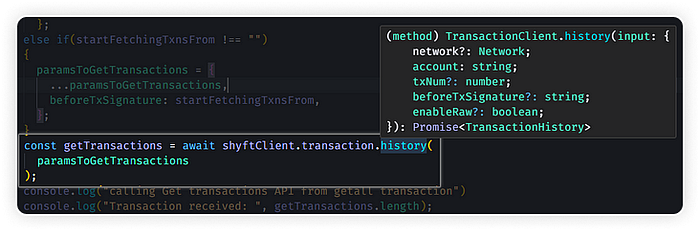
SHYFT’s JS SDK for Solana
Filtering transactions according to our Use-Case
The next step involves filtering all the transactions so that we can select the transactions relevant to our use-case. First, we iterate through the list of transactions we have gathered in the previous step, and check for “SWAP” type transactions. Since all the transactions received from SHYFT are pre-parsed and “Human-readable”, we can directly check if the type field is SWAP. Once this is complete, we will have an array of **SWAP** transactions directly or indirectly involving booty tokens.
for (let index = 0; index < getTransactions.length; index++) {
  const eachTransaction = getTransactions[index];

  var txnTimeStamp = new Date(eachTransaction.timestamp);

  if (endingTime > txnTimeStamp) {
     transactionFetchComplete = true;
     break;
  }

   //checking and filtering SWAP transactions from the transactions received
   if (eachTransaction.type === "SWAP")
       transactions.push(eachTransaction);
 }
Now, we filter transactions from the previous SWAP transactions set for transactions occurring on Orca Whirlpool. Owing to SHYFT’s Pre-parsed transactions this can easily be done by checking the protocol field, which contains the name and account address of the protocol on which the transaction is occurring.
function getOrcaSwaps(transactions, address) {
  try {

    //filtering transactions from Orca Whirlpool
    var orcaTransactions = transactions.filter((eachTxn) => eachTxn.protocol.address === address);
    return orcaTransactions;

  } catch (error) {
    console.log("Some error Occured");
    return [];
  }
}
Processing Information and Displaying to the User
We can now display these transactions accumulated in the UI in an user-friendly format. Apart from this, we can also calculate various insights, such as total number of swaps, total volume swapped, number of unique swappers, etc. When a user contributes funds to a liquidity pool, they usually deposit pairs of cryptocurrencies. Thanks to SHYFT’s pre-parsed transactions, all this information can be readily extracted and furthermore, we can identify the specific tokens involved in the exchange, including the tokens that have been swapped for booty tokens and the tokens for which booty tokens have been exchanged.
Conclusion — An alternative way
Another approach to solve the aforementioned problem involves retrieving all transactions from Orca Whirlpool during a specific one-hour period. Subsequently, we can proceed to sort out the ‘SWAP’ transactions from the array of received transactions. Finally, we can specifically identify and filter ‘SWAP’ transactions that involve ‘booty’ tokens to obtain the final set of transactions. Nevertheless, it’s important to note that Orca Whirlpool is an exceptionally active executable account with a high transaction volume occurring every second. This implies that we would need to process a significantly larger number of transactions compared to the previously illustrated method.
If you liked this article, feel free to explore other articles on tracking cNFT marketplace events or building a discord bot for cNFTs on Solana. The above project is also available on our GitHub here. A big thank you for the read time, we really hope you enjoy building with SHYFT.
P.S. The above project is also available for you to follow along on YouTube here.
Resources
Related Posts

How to update metadata URI for an NFT on Solana
NFT Metadata is the unique properties or details which make an NFT different from each others. In this article, we will ...
January 22, 2026
How to Redeem Solana Loyalty Tokens on eCommerce Website(Part 3)
Loyalty-based eCommerce websites have grown popular in recent years. This article illustrates how to let users of an eCo...
January 22, 2026
How to reward Solana loyalty tokens on an eCommerce website(Part 2)
Loyalty rewards on eCommerce websites are quite common these days. This blog illustrates how you can build an eCommerce ...
January 22, 2026

Get in touch with our discord community and keep up with the latest feature
releases. Get help from our developers who are always here to help you take off.