getProgramAccounts (15ms p50 for top dexes) & getTransactionsForAddress (signatures and transaction data in a single call). Unlock Now!How to track ticket purchased for a Famous fox raffle on Solana

Team Shyft
· January 22, 2026
In this article, we explore a way to track the number of tickets purchased for a particular Famous Fox Raffle on Solana, powered by SHYFT API.
NFT or token raffles on Solana Blockchain are very popular right now. Numerous NFT projects and DAOs enhance token utility by introducing investment prospects to their community through a structured approach. One example of such a project is the Famous Fox Federation (abbreviated as FFF). FFF is a collection of 7,777 randomly generated NFTs that exist on the Solana Blockchain, and they have recently launched a Raffle site, which has got them a lot of eyeballs. Here, you can create your own “RaFFFle” (as stated by FFF), sell tickets, buy tickets for other “RaFFFles” and win various tokens. With almost 400+ NFTs raffled everyday, tracking raffles on Solana may be a bit tricky.
Welcome to Solana Brainfood, your weekly dose of dev content, tutorials, code walkthroughs and much more — byte-sized content to juice up your Solana IQ. Whether you’re a seasoned pro looking to enhance your expertise or a beginner eager to learn something new, we have something in store for everyone. In today’s episode, we will explore one of the easiest ways of tracking all “RaFFFle” tickets purchased for a particular raffle on Foxy Raffle using SHYFT APIs. By the end of this article, we will have enough resources and methods to achieve something like this dashboard.
Feel free to checkout this project on GitHub.

A Dashboard with various details of a Rafffle such as the number of tickets sold, total sales, etc. fully powered by SHYFT APIs.
Read SHYFT API Documentation here.
Before getting started
To get started, we will need a few things.
Register your SHYFT account and get your own Shyft API key
x-api-key is an authentication parameter, which gives you access to SHYFT APIs.
You can get your own API Key from the SHYFT website.
Just signup with your email id here and you can get it for free. If you already have a SHYFT API Key, please skip this step.
NextJs or any dev environment/stack that supports API calls
We have used Next js for this project, but this can be done in any application development environment.
Excited much? Let’s start building.
Tracking Tickets sold in a RaFFFle: Steps involved
To summarize, the entire process primarily involves three steps:
— Suppose we have a raffle (say raffle address: 9BSvwa…..Bj1) and we want to find out the number of tickets sold. First, we will attempt to get all transactions related to that raffle.
—Once completed, we have to filter out all the BUY_TICKETS transactions. These transactions indicate that someone has purchased an ‘x’ amount of tickets and some tokens have been deducted from their account. These filtered transactions can now be stored in an array or a database for further processing.
— The final step involves aggregating all the data from the transactions stored in the previous step. Each BUY_TICKETS transaction contains info field which contains the details about the buyer and the number of tickets bought. The sum total of the tickets bought in each transaction should yield the total number of tickets sold for that particular raffle.
Getting Transactions for the raffle
Suppose we are attempting to find out the number of tickets sold for a particular raffle, say raffle address 9BSvwa…..Bj1.As discussed, the first step involves getting transactions for this raffle. There are various methods for getting transactions on Solana, but we will explore one of the most convenient methods of fetching transactions on Solana, which is using SHYFT API or using SHYFT’s very own JS SDK for Solana.
SHYFT provides a comprehensive set of APIs, exclusively for Solana Blockchain, that includes APIs for Non-Fungible Tokens(NFTs), Fungible Tokens(cryptocurrencies), crypto-wallets as well as transactions. Moreover, SHYFT also provides a JS SDK which is an extremely useful tool for developers who are building on Solana.
The API endpoint for getting transactions for a particular account on Solana:
GET https://api.shyft.to/sol/v1/transaction/historyParameters required for this API call
All SHYFT APIs accept the x-api-key parameter in the header, which is used as an authorization parameter for using SHYFT APIs. You can get your free API key from SHYFT website here. This API supports pagination.
network: can bedevnet,testnetormainnet-beta.account: The account address whose transactions we are attempting to fetch, in our case this will be the raffle address9BSvwa…..Bj1.tx_num(optional): Indicates the number of transactions to be fetched at a time.before_tx_signature(optional): Transactions are fetched in the order of the most recent transaction first. This field accepts a transaction signature and will fetch all the transactions before this transaction (in time).enable_raw: All transactions returned from this endpoint are “Human-readable” parsed Transactions from Solana. If this is set to true, raw transactions are also returned along with parsed transactions.
Once successfully executed, the response returned contains an array of parsed transactions related to the account provided in the address field. The response has the following structure.
{
    "success": true,
    "message": "Transaction history fetched successfully",
    "result": [
        "timestamp": "2023-08-22T15:37:38.000Z",
            "fee": 0.000105,
            "fee_payer": "H6ZLTRpVXobSYuNWufG8iqN9dMRQyZkXXSR5nEaeW73r",
            "signers": [
                "H6ZLTRpVXobSYuNWufG8iqN9dMRQyZkXXSR5nEaeW73r"
            ],
            "signatures": [
                "43rcisywmVC7JATBi2TRZX4z2jiEjzvi9BaFts1z5rLvpf5RpQ82c7QoQGzKgGpfm33NV3RMp22qTyMcaLEnNDNe"
            ],
            "protocol": {
                "address": "9ehXDD5bnhSpFVRf99veikjgq8VajtRH7e3D9aVPLqYd",
                "name": "FOXY_RAFFLE"
            },
            "type": "BUY_TICKETS", //main action indicating Rtype of transaction
            "status": "Success",
            "actions": [
                {
                    "info": {
                        "raffle_address": "9BSvwaVkHBjciQ5UshiiguL1ucSqLv2LXDRcKBGf6Bj1",
                        "currency": "So11111111111111111111111111111111111111112",
                        "ticket_price": 0.245, //each ticket price
                        "tickets": 10, //tickets bought by the buyer
                        "buyer": "H6ZLTRpVYobSYuNWufG8iqN9xMRQyZkXXSR5nEaeW73r" //buyer
                    },
                    "source_protocol": {
                        "address": "9ehXDD5bnhSpFVRf99veikjgq8VajtRH7e3D9aVPLqYd",
                        "name": "FOXY_RAFFLE"
                    },
                    "type": "BUY_TICKETS"
                },
                {
                    "info": {
                        "amount": 2.45,
                        "sender": "H6ZLTRpVYYuNWufG8iqN9dMRQyZkXXSR5nEaeW73r",
                        "receiver_associated_account": "F8tETMLhvLRmXLibEWES5faiHYUFrNJ2AhyRd89Kzz1R",
                        "receiver": "9BSvwaVkHBjciQ5UshiiVYubSqLv2LXDRcKBGf6Bj1",
                        "token_address": "So11111111111111111111111111111111111111112"
                    },
                    "source_protocol": {
                        "address": "TokenkegQfeZyiNwAJbNbGKPFXCWuBvf9Ss623VQ5DA",
                        "name": "TOKEN_PROGRAM"
                    },
                    "type": "TOKEN_TRANSFER",
                    "parent_protocol": "9ehXDD5bnhSpFVRf99veikjgq8VajtRH7e3D9aVPLqYd"
                },
                {
                    "info": {
                        "sender": "H6ZLTRpVXobSYVYWufG8iqN9dMRQyZkXXSR5nEaeW73r",
                        "receiver": "AxGPdJRvpApHv6CHMQpVYCUdeER5xgfhzXAeJguLSkk",
                        "amount": "2.450000000"
                    },
                    "source_protocol": {
                        "address": "11111111111111111111111111111111",
                        "name": "SYSTEM_PROGRAM"
                    },
                    "type": "SOL_TRANSFER"
                }
            ]
        }
    ]
}
Please note this is a sample response; more detailed documentation can be found here. The JS SDK also accepts similar parameters and only the result is returned as a response.
Press enter or click to view image in full size
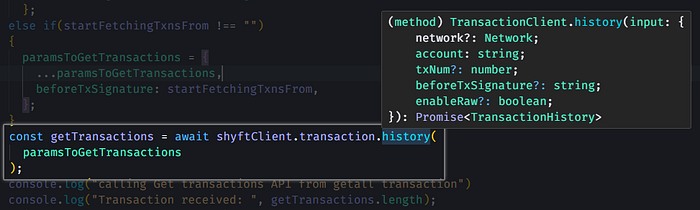
Equivalent JS SDK function for the above API
Check our JS SDK for Solana here.
Gathering and filtering transactions
We can use the above **transactions/history** endpoint/the equivalent JS SDK function to fetch all the transactions related to this raffle. We have to continue fetching transactions (in a paginated manner, say 10 transactions at a time) until the length of transactions received is 0.
   while (!transactionFetchComplete) {
      var paramsToGetTransactions = {
        network: Network.Mainnet,
        account: address,
        txNum: 10,
      };

      ....... // shortend code
      .......

      const getTransactions = await shyftClient.transaction.history(
        paramsToGetTransactions
      ); // getting all transactions for the address

      .......
      .......
      if (getTransactions.length === 0) {
        // checking if all transactions have been received
        transactionFetchComplete = true;
        break;
      }

    }
**Use Case: Getting transactions for a particular date
**There may be a case where instead of getting all transactions for the raffle, it may be required to fetch transactions for one particular day. If the date entered is the current date, we can start fetching transactions right away, but if the date is a bit older, like in our case 22nd August 2023, we have to get the last transaction (signature) of the next day, which is 23 Aug 2023, so that all transactions fetched before that are of 22nd Aug 2023 (using the before_tx_signature field). The date for each transaction is denoted by the timestamp field. One way of doing this is by calling the transaction/history endpoint (or the JS SDK equivalent) until we get the first transaction with the timestamp of our target date 22nd Aug 2023. Now if we access the transaction which is just before this transaction, we should ideally be the last transaction (oldest) of 23 Aug, 2023.
A working version of the project with this particular use case is also available on GitHub.
**Filtering Transactions
**Now, comes the part of filtering the transactions. There are a lot of ways of parsing raw transactions from Solana however, transactions provided by SHYFT using the above API are already pre-parsed and human-readable. Each transaction returned has a typefield that indicates the main action(according to SHYFT’s parsing logic), and the actions array contains all the details of actions performed under that transaction. We can use the main action type or the inner action type to filter the transactions which are BUY_TICKETS. Once we have got all the BUY_TICKETS transactions for the raffle 9BSvwa…..Bj1 , we can store it in an array or a database for further processing.
for (let index = 0; index < getTransactions.length; index++) {
    const eachTransaction = getTransactions[index];

    if (eachTransaction.type === "BUY_TICKETS")
       transactions.push(eachTransaction);

    //Filtering BUY Tickets Transaction
}       }
{ ...........
"type": "BUY_TICKETS", //main action indicating type of transaction
"status": "Success",
"actions": [
{
"info": {
"raffle_address": "9BSvwaVkHBjciQ5UshiiguL1ucSqLv2LXDRcKBGf6Bj1",
"currency": "So11111111111111111111111111111111111111112",
"ticket_price": 0.245, //each ticket price
"tickets": 10, //tickets bought by the buyer
"buyer": "H6ZLTRpVYobSYuNWufG8iqN9xMRQyZkXXSR5nEaeW73r" //buyer
},
"source_protocol": {
"address": "9ehXDD5bnhSpFVRf99veikjgq8VajtRH7e3D9aVPLqYd",
"name": "FOXY_RAFFLE"
},
"type": "BUY_TICKETS"
},
................ //Response shortened
}Getting Aggregated Information
Now, that we have the set of parsed BUY_TICKETS transactions with us, we are ready to process some meaningful information out of it. In order to achieve our objective, which is getting all tickets sold for a particular raffle (raffle **9BSvwa.....Bj1**) in a day, we have to iterate through each transaction and find out the number of tickets sold per **BUY_TICKETS** transaction. All the values, once aggregated, yield the tickets sold in one day.
Conclusion
The set of transactions can also be used to calculate various other information such as total sales. Raffles generally have the same price for all tickets, so the product of each ticket_price and the number of tickets sold should be the total sales value.
if (eachTicketPrice === 0)
    eachTicketPrice = eachTransaction.actions[0].info.ticket_price;

totalTickets = totalTickets + eachTransaction.actions[0].info.tickets;
totalPrice = totalPrice + (eachTransaction.actions[0].info.tickets * eachTransaction.actions[0].info.ticket_price);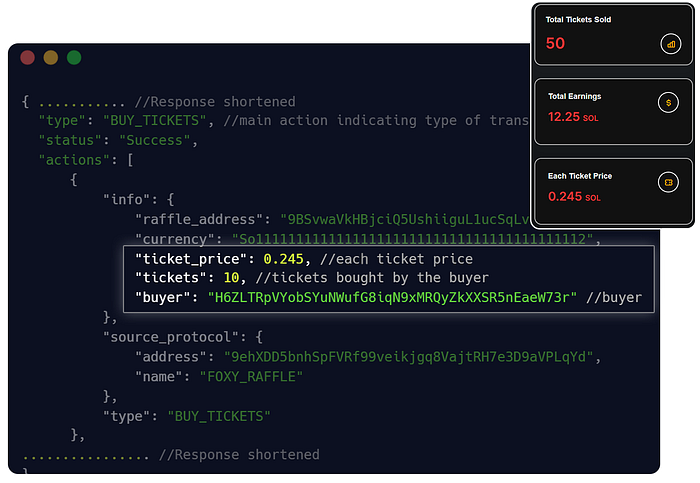
Calculating Total Tickets Sold and Total Earnings from all transactions saved
Various other sets of data can also be calculated, formatted, and displayed as shown in the other parts of our dashboard. We can calculate the total number of tickets sold every hour (or over a particular period of time) using the timestamp and the tickets sold values, and then aggregate the data on an hourly basis.
We can find out the top buyers in our raffle by checking the buyers in each transaction and finding out the unique buyers, and the total tickets they have bought for the raffle. The data can be displayed in a sorted manner according to the tickets they have bought.
transactions.forEach((eachTxn) => {
    const currentInfo = eachTxn.actions[0].info;
    if (countBuyer[currentInfo.buyer]) {
      countBuyer[currentInfo.buyer] += currentInfo.tickets;
    } else {
      countBuyer[currentInfo.buyer] = currentInfo.tickets;
    }
});

var countBuyerArray = [];
for (const key in countBuyer) {
    if (countBuyer.hasOwnProperty(key)) {
        const buyerObj = {
            buyer: key,
            tickets_bought: countBuyer[key],
        };
        countBuyerArray.push(buyerObj);
    }
}

return {
    buyers: countBuyerArray.sort((a, b) => b.tickets_bought - a.tickets_bought),
};
Press enter or click to view image in full size
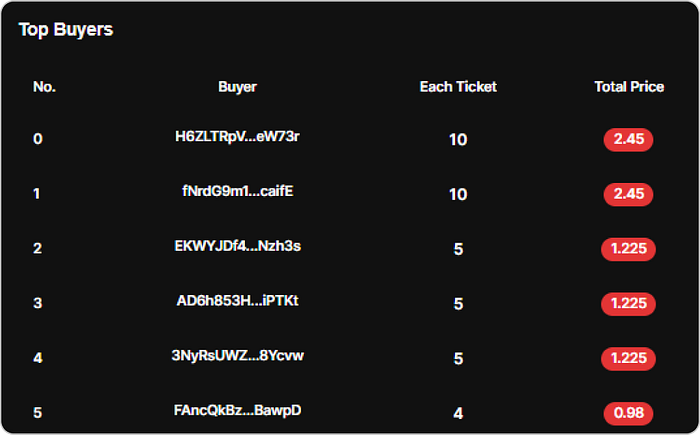
Sorted top buyers data from the transactions
Formatted transactions can also be shown in the UI in a timeline format, arranged in a particular order of their timestamp. As we see, once we get all the relevant transactions to our use case, they can be aggregated and presented in various ways. Thanks to SHYFT, for their APIs and their human-readable parsed transactions, we can develop dApps similar to this in a swift and hassle-free manner.
Just in case you want to follow along, the above project is available here in our GitHub repo.
Press enter or click to view image in full size
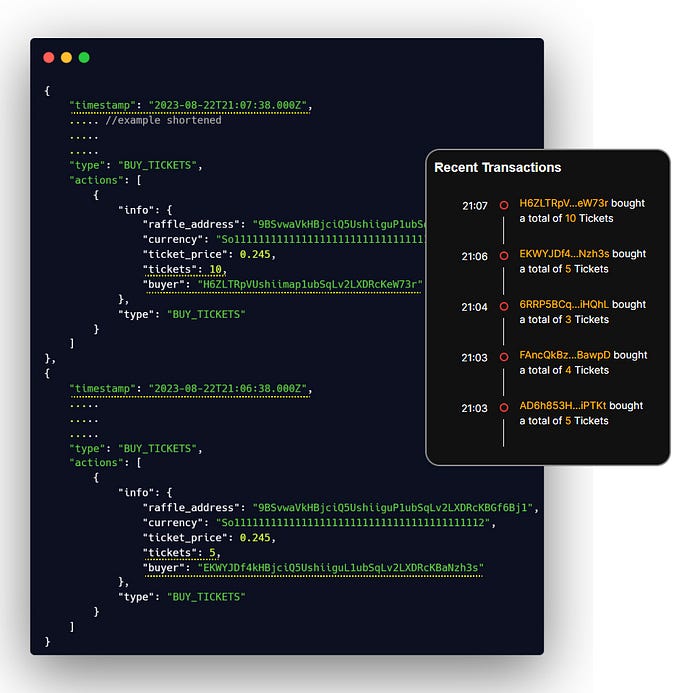
Listing Recent Transactions with the transactions received in the previous step
Bonus: Getting Live Transactions on Solana
Another similar application can be real-time raffle monitoring where instead of monitoring the tickets sold or total sales on a raffle on a particular date, users may want to monitor a raffle live i.e. in real-time. This would require events (such as **BUY_TICKETS** in our case) to be reported to our application as soon as they happen on-chain. This can also be achieved very easily with SHYFT using a reliable transaction reporting service in the form of callbacks. Using SHYFT’s callback service, parsed transactions can be reported to the user’s/application’s server, as soon as they happen on-chain, thus tracking all the live events that are happening on a particular account address. Now each received transaction can be checked if it is an event of interest (as in our case it is BUY_TICKETS), and data can be recalculated and repopulated to the application’s dashboard live.
A complete guide on how to setup, update, and receive parsed transactions from callbacks on Solana using SHYFT APIs.
If you want to check out similar projects on activity feed and monitoring, feel free to our article on Tracking cNFT marketplace events on Solana or Creating a live activity feed on Solana.
Feel free to check out this project on GitHub, and star our Solana Brainfood repo if you find it interesting. Your support means a lot to us! We hope you have a great time building with SHYFT, Happy Hacking!
Resources
Related Posts

How to track all $Booty token swaps in one hour on Orca
In this article, we will explore an intuitive way of tracking all $Booty token swaps in an hour on Orca, powered by SHYF...
January 22, 2026
How to track votes for realms proposal on Solana
Governance programs on Solana typically involve tokens, which holders use to decide proposals, upgrades, and other impor...
January 22, 2026
Managing Callbacks in a Web3 activity feed (Part 2)
Efficiently handle real-time data updates on Solana-powered dApps with smart callback management APIs. Callback APIs can...
January 22, 2026

Get in touch with our discord community and keep up with the latest feature
releases. Get help from our developers who are always here to help you take off.