getProgramAccounts (15ms p50 for top dexes) & getTransactionsForAddress (signatures and transaction data in a single call). Unlock Now!
Web3 Wallet data is one of the top requirements for various projects built on Solana. In this article, we will see how we can effectively access wallet data on Solana using SHYFT APIs.
Cryptocurrencies have become increasingly popular, with the growth of their underlying technology — blockchains. A Crypto-wallet is an application that functions like a regular wallet, except it is used to store Fungible cryptocurrencies and Non-fungible Tokens. It is an access point for your cryptocurrencies and holds the pass keys to sign digital crypto transactions.
Modern Crypto wallets make blockchains accessible to everyone and many dApps require wallet data to be efficiently read and processed. In order to retrieve data about a wallet on the Solana, you will need to use a tool or library that is able to communicate with the blockchain and retrieve the data. Several libraries and tools can be used to retrieve data about a wallet on Solana, including the Solana CLI (command-line interface) and the Solana web3.js library.
It is essential to note Web3 grants you custody and control over your assets, which also means being aware of security concerns. Two confidential aspects of any Web3 wallet are the wallet’s private key and the seed phrase, which if compromised of which can lead to the loss of assets. So we need a solution simple enough to be used or integrated easily in dApps, along with secure wallet data access. This is where SHYFT steps in. SHYFT offers an API-based solution for various operations on Solana, including APIs for getting wallet data secure manner. In this article, let’s see how we can get wallet data on Solana using SHYFT APIs.
Read SHYFT API Documentation here.
Before getting started
To get started, we will need a few things.
Authentication: Getting your Shyft API key
x-api-key is an authentication parameter, which gives you access to SHYFT APIs. You can get your own API Key from the SHYFT website. Just signup with your email id here and you can get it for free.
Phantom Wallet
We will need the Phantom wallet browser extension, you can download it from the link below.
Once done, set up your Phantom wallet account. On-screen tips are available, which will guide you through setting up and getting started. You can also find a detailed guide related to this here.
Getting Wallet Portfolio — an API-based solution
SHYFT provides an API for getting the entire wallet portfolio, both Fungible and Nonfungible Token data in one request. The API Endpoint for getting the wallet portfolio:
GET <https://api.shyft.to/sol/v1/wallet/get_portfolio?network=devnet&wallet=YOUR_WALLET_ADDRESS>This API accepts x-api-key parameter in the header, which is an authorization parameter used by SHYFT for validating its users. You can get your own **x-api-key** from the SHYFT website for free here.
Get Team Shyft’s stories in your inbox
Join Medium for free to get updates from this writer.
Parameters required for this API request
network: Select the Solana network cluster, which can be eitherdevnet,testnetormainnet-beta. The tokens and NFTs that exist on this network will be fetched.wallet: Accepts the wallet address of the wallet whose data is being fetched.
The wallet address and the network parameters can be taken as input from the user using a simple form in the front end or can be directly set in the back end, as per requirement.
Press enter or click to view image in full size
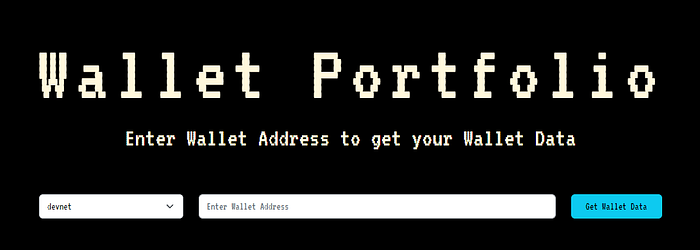
HTML form to accept wallet address and network
Once the API request is executed successfully, the response returned looks somewhat like this.
{ "success": true, "message": "Portfolio fetched successfully", "result": { "sol_balance": 1.87873304, "num_tokens": 2, "tokens": [ { "address": "4TLk2jocJupKsZubcMFCqsEFFu5jVGzTp14kAANDaEFv", "balance": 500000 }, { "address": "7yPeRofJpfEyjLJ8CLB7czuk4sKG9toXWVq8CcHr4DcU", "balance": 310.000001 } ], "num_nfts": 3, "nfts": [ { "key": 4, "updateAuthority": "BvzKvn6nUUAYtKu2pH3h5SbUkUNcRPQawg4bURBiojJx", "mint": "ApJPjFr585xKSMk7EtAKU4UrcpyEgdN7X8trvd3gChYk", "data": { "name": "Nightweaver", "symbol": "NW", "uri": "<https://nftstorage.link/ipfs/aafkreidwzqo2fjyas32s2bhsvjo7fyi42yidtg5hpzetlsrij66eq3xblm>", "sellerFeeBasisPoints": 0, "creators": [ { "address": "BvzKvn6nUUAYtKu2pH3h5SbUkUNcRPQawg4bURBiojJx", "verified": 1, "share": 100 } ] }, "primarySaleHappened": 0, "isMutable": 1 }, { "key": 4, "updateAuthority": "BvzKvn6nUUAYtKu2pH3h5SbUkUNcRPQawg4bURBiojJx", "mint": "9XTGWZENKa18N1vgCQ3RjJWHG92Di2JKYi73jiC4hkEM", "data": { "name": "SHYFT", "symbol": "SHF", "uri": "<https://nftstorage.link/ipfs/cyfkruh2askugb2wgbl2qkpfzd6bn34zkzjswfeo3esichllkn2m7fpffs4hy>", "sellerFeeBasisPoints": 5, "creators": [ { "address": "BvzKvn6nUUAYtKu2pH3h5SbUkUNcRPQawg4bURBiojJx", "verified": 1, "share": 100 } ] }, "primarySaleHappened": 0, "isMutable": 1 } ] }}The API response contains the wallet’s sol_balance, an array of SPL tokens in the wallet, indicated by the tokens array, and the NFTs in the wallet, indicated by the nfts array. This wallet data can be utilized in any dApps including the ones trying to showcase a user’s Web3 Wallet Portfolio, checking the wallet data of a user for granting some form of gated access, and many more.
Press enter or click to view image in full size
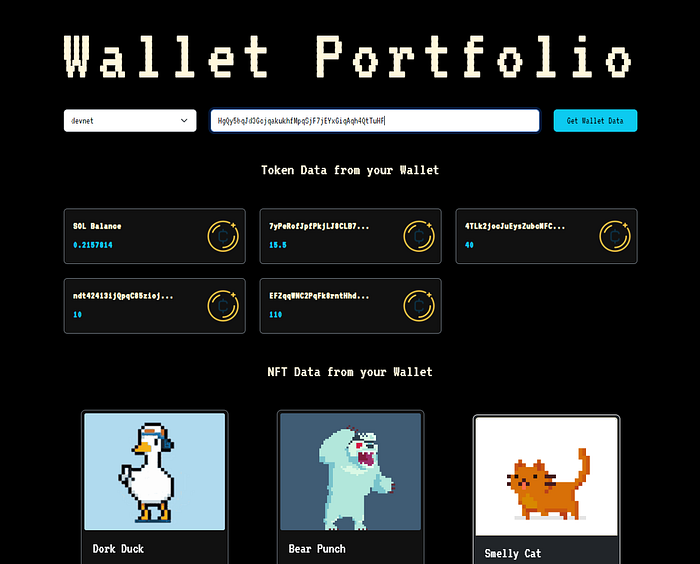
Showcasing Wallet Data received in the response
Getting the Transaction History of a Wallet
Most dApps showcasing wallet data also have provisions of showing the transactions related to the wallet. We can also fetch paginated transaction data from the wallet using SHYFT APIs. The API endpoint
GET <https://api.shyft.to/sol/v1/wallet/transaction_history>To know more about transaction data in detail, please refer to our article on how to get paginated transactions on Solana using SHYFT APIs. You can also find the details of the parameters for the API request on our dev docs here.
Bonus: The SHYFT Software Development Kit
Along with SHYFT’s extensive Web3 APIs, SHYFT has also launched an all-new SDK for the Solana blockchain. With this SDK, you can perform various operations on Solana such as getting NFT details by mint address, or by owners, getting wallet balance, portfolio, and many more. Here is a sneak peek at how you can get a wallet portfolio using the all-new SHYFT SDK.
Installation and initialization
To install the SHYFT SDK with npm, use the following command:
npm install @shyft-to/jsYou can import it into your project using
import { ShyftSdk, Network } from '@shyft-to/js';Getting Wallet Data using SDK
To get wallet data,
const shyft = new ShyftSdk({ apiKey: 'YOUR_API_KEY', network: Network.Devnet }); (async () => { const portfolio = await shyft.wallet.getPortfolio({ wallet:WALLET_ADDRESS, network:Network.Devnet }) console.log(portfolio); })();Wrapping up, both SHYFT APIs and the SHYFT SDK are ways with which you can fetch wallet data in a secure and hassle free manner. If you enjoy building with SHYFT, feel free to check out our other articles on Creating a Candy Machine (v3) on Solana or Airdropping tokens on Solana.
We hope you have a great web3 development journey with SHYFT!
Resources
SHYFT API Documentation
Shyft Website
Get API Key
GitHub
Join our Discord
The All New SHYFT SDK
Try out our APIs on Swagger UI
Related Posts

Solana getProgramAccounts Benchmark: Shyft’s Accelerated gPA vs. Standard Node
A closer look at gPA’s two-phase scan architecture, benchmarked against a standard Solana RPC node. getProgramAcco...
July 17, 2026
Accelerated getProgramAccounts: Shyft’s Fix for Solana’s Most Expensive RPC Call
A deep dive into why standard RPC nodes struggle with getProgramAccounts, and how a dedicated accounts engine built on R...
June 5, 2026
How to Reconnect and Replay Slots with Solana Yellowstone gRPC
In this article you will learn how to implement a reconnect logic for your Solana gRPC streams with replay functionality...
January 24, 2026

Get in touch with our discord community and keep up with the latest feature
releases. Get help from our developers who are always here to help you take off.