getProgramAccounts (15ms p50 for top dexes) & getTransactionsForAddress (signatures and transaction data in a single call). Unlock Now!Accelerated getProgramAccounts: Shyft’s Fix for Solana’s Most Expensive RPC Call

Team Shyft
· June 5, 2026
A deep dive into why standard RPC nodes struggle with getProgramAccounts, and how a dedicated accounts engine built on RocksDB solves it at the infrastructure level.

TL;DR
- Standard Solana RPC nodes can find accounts by owner – but have no index over what’s inside them. Every memcmp filter is a full scan.
- Shyft built a dedicated accounts engine in Rust: gRPC ingestion, RocksDB storage, stateless JSON-RPC serving – all in one service boundary. Most accelerated queries resolve in under 10ms.
- 14 programs accelerated today including Raydium, Orca, Meteora, Pump.fun, Drift and Jupiter. No code changes required.
- In benchmark testing across four programs, accelerated gPA queries resolved with an average response time under 11ms and a p90 under 16ms across all programs tested.
The Most Expensive Call on Solana
If you’ve built anything on Solana that reads accounts by program – a trading bot, a DeFi dashboard, a portfolio tracker – you’ve called getProgramAccounts. And if you’ve called it against a large program under real conditions, you already know what happens: it’s slow, it’s inconsistent, and under load it times out.
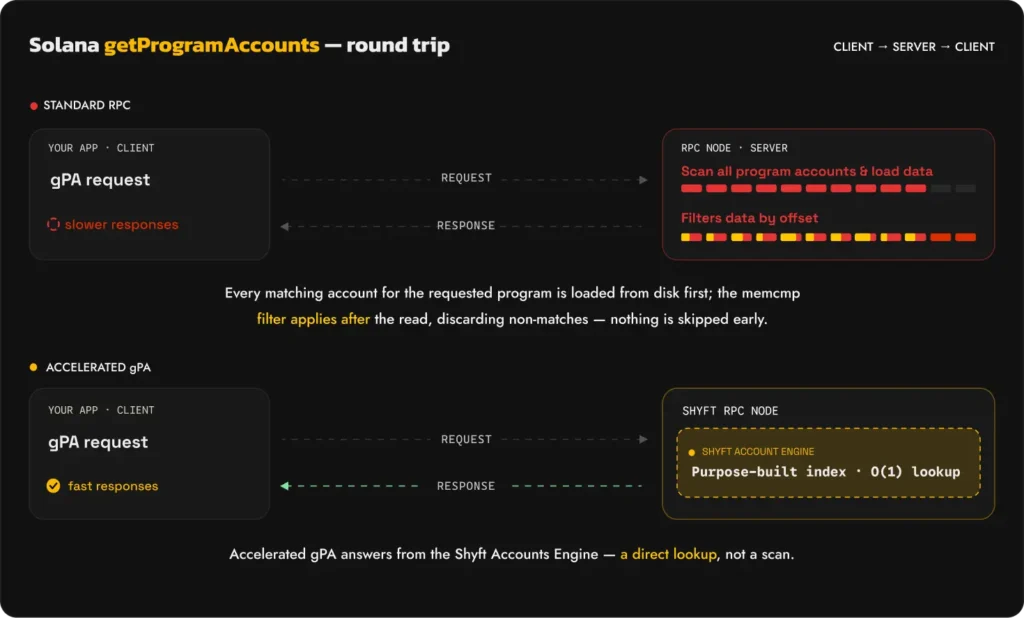
Here’s why. When you call getProgramAccounts with a memcmp filter, a standard Solana validator has no index to look that up against. It goes through every single account owned by that program, reads the data buffer, checks your filter condition, and either keeps or discards the account. Every account. Every time. No shortcuts.
For a small program this is tolerable. For Raydium CLMM or Pump.fun with hundreds of thousands of accounts, this is a full table scan on every request – response times in the hundreds of milliseconds, nodes straining under repeated load, providers throttling or charging a premium for the method.
This is not a bug. It is a consequence of how the Solana validator stores account data – optimised for writing blocks fast, not for reading accounts with arbitrary filters. The root cause is structural.
Standard nodes have no index over account data, so every call triggers the same full scan regardless of how specific your filter is. Shyft builds the index.
Enter Accelerated gPA.
What “Building an Index” Actually Means
An index lets you find matching records without scanning everything – like a book index that takes you directly to the right page instead of reading every one. For getProgramAccounts, an index keyed by program address and byte offset means a query for Raydium CLMM pools containing a specific token resolves as a direct lookup rather than a walk of every pool account. The challenge is that adding this index inside the validator would compete for the same hardware resources doing consensus and block replay – at exactly the moment when the network is busiest. So you build it outside, on dedicated infrastructure, with a live feed of account updates piped in directly from the validator. Shyft exactly does that.
How Accelerated gPA Works: The Shyft Accounts Engine
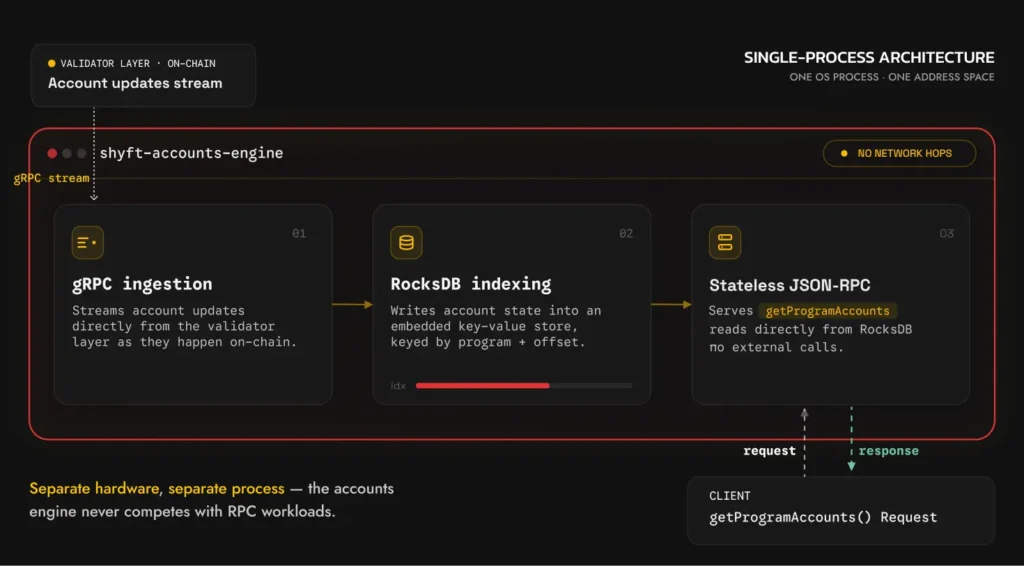
Shyft’s accounts engine is a purpose-built Rust service running on dedicated infrastructure with no consensus responsibilities. Its only job is to maintain an accurate, indexed view of account data and answer getProgramAccounts queries against it as fast as possible.
The entire pipeline runs within a single service. No external database connections. No network hops between internal components. Every operation – receiving an update, writing to storage, serving a read – is a direct in-process function call. This is what makes sub-10ms response times achievable: there are no internal boundaries where time is lost.
- Stream account updates in real time: The engine holds a live gRPC connection to the validator layer – the same streaming interface used by Geyser plugins. Every time an account owned by an accelerated program changes on-chain, the update is pushed to the engine immediately. No polling, no scheduled refresh. The engine receives state changes as they are produced by the validator.
- Persist account states: Account state is written into RocksDB – an embedded key-value store that runs as a library inside the same process. This is the critical distinction: most databases run as separate processes, and every read crosses a network boundary even on localhost. With RocksDB, a read is a direct function call into the storage layer. No TCP connection, no query parsing, no round-trip. RocksDB also happens to be the same storage engine Agave uses internally for its own account state – the choice reflects a shared understanding of the access patterns involved.
- Route queries to the fastest path: For each accelerated program, the engine maintains indexes keyed by the offsets developers most commonly filter on. A
getProgramAccountscall resolves as a direct key-value lookup – not a scan. The engine automatically identifies the accelerated offset from whichever filters you pass, regardless of order. Additional filters are applied in-memory against the already-narrow result set. Raw account state is never touched.
- Respond through stateless JSON-RPC layer: A stateless JSON-RPC layer handles incoming requests and routes them to the right path – accelerated index lookup or standard fallback. From your application’s perspective, nothing changes. Same method, same parameters, same response shape. The acceleration is invisible.
Why RocksDB?
Account lookups by program + offset are pure key-value reads. RocksDB is purpose-built for exactly this access pattern – it’s the same storage engine used inside the Solana validator itself. Two properties make it the right choice here:
| External DB (Postgres, Mongo) | RocksDB (embedded) |
|---|---|
| Network hop on every read Each query opens a connection, crosses a network boundary, waits for the DB server to respond. Adds latency that can’t be optimised away. | In-process, zero network hop RocksDB runs inside the same process. A lookup is a local function call into the storage layer – no connection string, no round-trip latency. |
Because RocksDB is a key-value store rather than a relational database, there are no query plans, no join operations, and no row-scanning. A read by key resolves in microseconds regardless of how many total accounts are stored.
How the Engine Catches Up — Every Time It Starts
The engine receives a stream account updates in real time. When the accounts engine starts, it loads a standard Solana validator snapshot – the same snapshot format validators use for fast restarts – giving the engine a full baseline of account state at a specific slot without replaying the entire chain history. The gRPC stream starts simultaneously, receiving live account updates from the current slot onwards.
Since the snapshot and the gRPC stream start at different slots, there is an inevitable gap between them. The engine detects this gap – comparing the snapshot slot against the first slot received over gRPC – and backfills the missing account updates using getBlocks, fetching every block in the gap and applying the account changes in order. Once the backfill completes, the engine is fully in sync with current account state. The gRPC stream keeps it live from that point forward, with no polling and no scheduled refresh – every account update arrives as it is produced by the validator.
How memcmp Filters Actually Work: A working example
Raydium CLMM at Offset 73
A Raydium CLMM pool account is an Anchor account. Anchor accounts open with an 8-byte discriminator, followed by the struct fields laid out sequentially – each field occupying a fixed number of bytes determined by its type.
| Byte Range | Size | Field |
|---|---|---|
| 0 – 7 | 8 bytes | Anchor discriminator |
| 8 – 39 | 32 bytes | amm_config |
| 40 – 71 | 32 bytes | owner |
| 72 – 103 | 32 bytes | token_mint_a ← offset 73 lands here |
| 104 – 135 | 32 bytes | token_mint_b |
Offset 73 is one byte into the token_mint_a field – the standard Anchor convention for memcmp filters on pubkey fields. Filtering here with a token mint pubkey as the bytes value returns every CLMM pool where that token is token_mint_a.
So this query:
{
  "filters": [
    {
      "memcmp": {
        "offset": 73,
        "bytes": "So11111111111111111111111111111111111111112",
        "encoding": "base58"
      }
    }
  ]
}
Returns every Raydium CLMM pool containing WSOL as token_mint_a. Swap the bytes value for any other mint pubkey to find pools containing that token instead.
The Accelerated Programs
| Protocol | Program Address | Accelerated Offsets |
|---|---|---|
| Pump.fun AMM | pAMMBay6oceH9fJKBRHGP5D4bD4sWpmSwMn52FMfXEA | 0, 43, 75 |
| Pump.fun | 6EF8rrecthR5Dkzon8Nwu78hRvfCKubJ14M5uBEwF6P | 0 |
| Raydium CLMM | CAMMCzo5YL8w4VFF8KVHrK22GGUsp5VTaW7grrKgrWqK | 0, 73, 105 |
| Raydium AMM v4 | 675kPX9MHTjS2zt1qfr1NYHuzeLXfQM9H24wFSUt1Mp8 | 400, 432 |
| Raydium CPMM | CPMMoo8L3F4NbTegBCKVNunggL7H1ZpdTHKxQB5qKP1C | 168, 200 |
| Meteora DLMM | LBUZKhRxPF3XUpBCjp4YzTKgLccjZhTSDM9YuVaPwxo | 0, 88, 120 |
| Meteora DAMM v2 | cpamdpZCGKUy5JxQXB4dcpGPiikHawvSWAd6mEn1sGG | 168, 200 |
| Meteora DAMM v1 | Eo7WjKq67rjJQSZxS6z3YkapzY3eMj6Xy8X5EQVn5UaB | 40, 72 |
| Orca Whirlpool | whirLbMiicVdio4qvUfM5KAg6Ct8VwpYzGff3uctyCc | 0, 101, 181 |
| Jupiter Lend/Borrow | jupr81YtYssSyPt8jbnGuiWon5f6x9TcDEFxYe3Bdzi | 0 |
| Drift | dbcij3LWUppWqq96dh6gJWwBifmcGfLSB5D4DuSMaqN | 0, 136 |
| PancakeSwap CLMM | HpNfyc2Saw7RKkQd8nEL4khUcuPhQ7WwY1B2qjx8jxFq | 0, 73, 105 |
| Address Lookup Table | AddressLookupTab1e1111111111111111111111111111 | 22 |
| Solana Stake Program | Stake11111111111111111111111111111111111111 | 12 |
Acceleration kicks in automatically: No code changes required. Acceleration is applied at the RPC layer automatically. Your existing getProgramAccounts calls work as-is – the engine intercepts matching requests and resolves them directly from the accounts engine, before raw account state is ever scanned.
How the Engine Handles Multiple Filters
Most real-world getProgramAccounts calls don’t use a single filter. A trading bot querying Raydium CLMM pools might filter by token_mint_a at offset 73 andtoken_mint_b at offset 105 simultaneously — narrowing the result to pools containing a specific trading pair. How the engine resolves these determines whether you get the fast path or not.
When one of your filters hits an accelerated offset:
The engine scans your filter set, identifies the accelerated offset, and resolves that filter first — regardless of where you placed it in the array. The accelerated lookup runs against the purpose-built index and returns a narrow result set immediately. Every remaining filter is then applied in-memory against that already-narrow set. Raw account state is never scanned. Filter order in your request does not matter — the engine finds the fast path automatically.
{
  "filters": [
    { "memcmp": { "offset": 200, "bytes": "SOME_OTHER_VALUE"  } },
    { "memcmp": { "offset": 73,  "bytes": "WSOL_MINT_PUBKEY" } }
  ]
}
Even though the accelerated offset 73 is second in the array, and offset 200 is not accelerated, the engine identifies 73 first and resolves it against the purpose-built index. The result is every CLMM pool where token_mint_a is WSOL — filtered further in-memory against the second condition. Two filters, one fast path.
When none of your filters hit an accelerated offset:
The engine falls through to the standard scan path — filters evaluated in order, full account set, no short-circuit. The request completes correctly, just without the speed benefit. For programs in the accelerated set, including at least one filter at an accelerated offset is all it takes — the engine handles the rest.
Latency Results
Tests were run from the AMS region using Hey with a persistent TCP connection – representative of how a real application reuses connections. 10 requests at 1 req/s, four programs, each at one of their accelerated offsets. Compared against a competitor also running a custom accounts indexing engine. Vanilla Agave nodes were excluded – response times on an unmodified validator for large programs can reach several seconds, making that comparison uninteresting.
| Program | Offset | Avg | p50 | p90 |
|---|---|---|---|---|
| Raydium CLMM | 73 | 8.7ms | 7.8ms | 15.2ms |
| Pump.fun AMM | 43 | 8.3ms | 7.9ms | 11.7ms |
| Address Lookup Table | 22 | 10.9ms | 10.7ms | 15.4ms |
| Orca Whirlpool | 101 | 8.2ms | 7.8ms | 12.4ms |
p50 is the median – half of all requests were faster. p90 is the 90th percentile – the worst-case response time for 90% of requests, and the number that matters most for production planning since it captures what your users experience when the system is under load.
Across all four programs, Shyft’s p90 was lower than the competitor’s p10 – Shyft’s worst case was faster than the competitor’s best case. With a persistent connection, expect 10–15ms for the majority of accelerated gPA queries. A cold first request adds approximately 5–10ms of network round-trip time.
Quick Start: Check out example cURL requests here to get started with Accelerated getProgramAccounts.
Resources
Related Posts

Solana getProgramAccounts Benchmark: Shyft’s Accelerated gPA vs. Standard Node
A closer look at gPA’s two-phase scan architecture, benchmarked against a standard Solana RPC node. getProgramAcco...
July 17, 2026
How to Reconnect and Replay Slots with Solana Yellowstone gRPC
In this article you will learn how to implement a reconnect logic for your Solana gRPC streams with replay functionality...
January 24, 2026
How to Update a Yellowstone gRPC Subscription Without Disconnecting the Stream
Learn how to dynamically update your Yellowstone gRPC SubscribeRequest on Solana without disconnecting the stream. Inclu...
January 24, 2026

Get in touch with our discord community and keep up with the latest feature
releases. Get help from our developers who are always here to help you take off.